
Help Center › Account & Billing › Your free Verified Student Account
Your free Verified Student Account
If your photography instructor invited you to Image Depot, you have a real, free account of your own -- a place to build a portfolio and host your photos while you're learning.
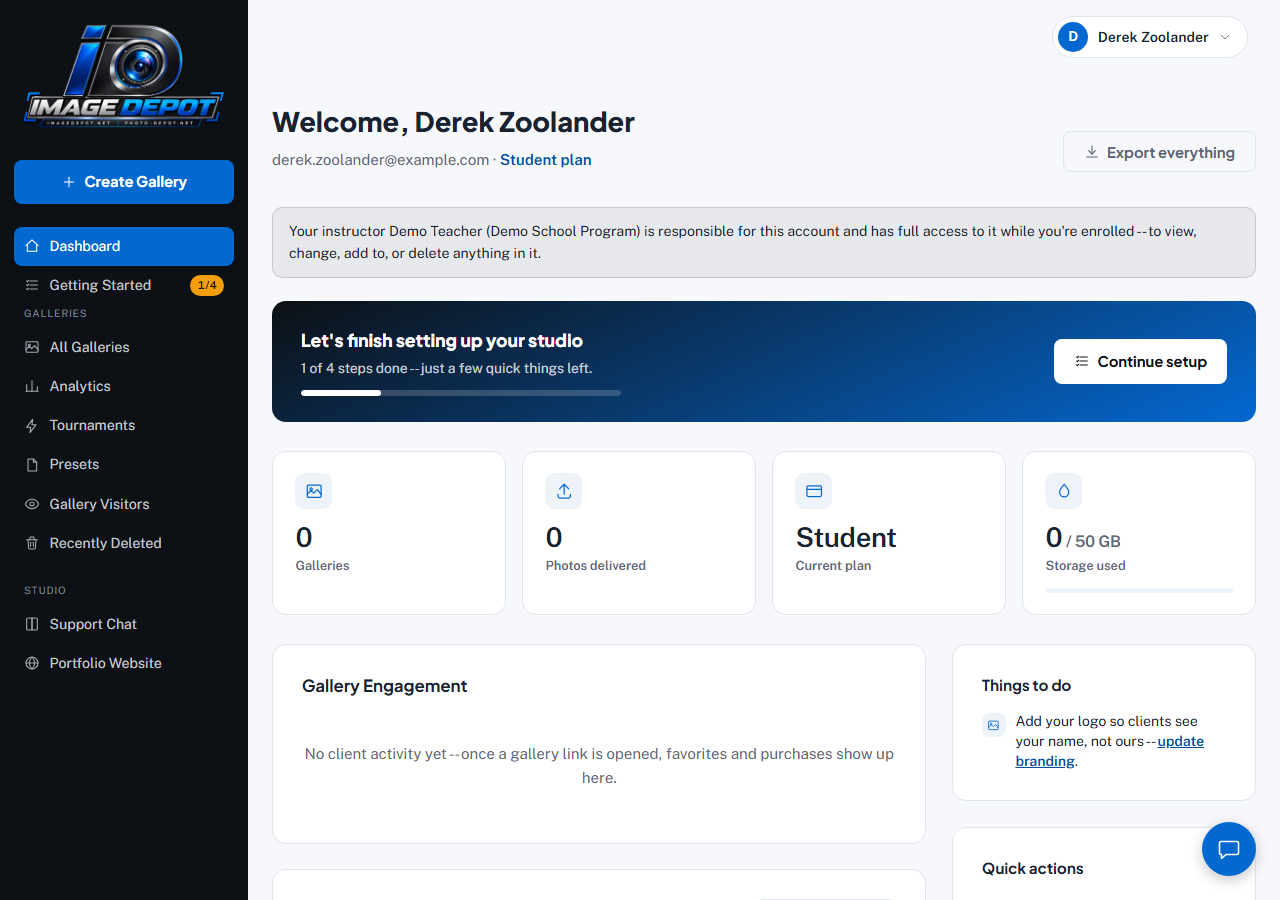
A Student account's dashboard -- notice the shorter sidebar (no Quick Upload, Sync, Users, or Migration Wizard) and the note about your instructor's access.
What's different from a regular account
A Student account is a smaller, simpler version of Image Depot, built for building a portfolio rather than running a photography business:
- No cost, ever -- it's free for as long as you're enrolled through your instructor's program.
- A few sidebar items regular studio accounts have (Quick Upload, Image Depot Sync, Users & Permissions, the Studio Migration Wizard) aren't there, since they're not needed for a portfolio.
- Your portfolio website can show a "Verified Student Photographer" badge once your instructor confirms you.
Your name on your public pages
Anything the public can see shows your first name and last initial (like "Alex R."), not your full name. That covers your portfolio pages, your galleries, the watermark on your photos, and emails to people who view or buy your photos. Your dashboard, and your instructor, still see your full name.
- Go to Portfolio WebsiteIn your dashboard sidebar. The first panel is Your name on your public pages.
- ChooseCheck Show my full name publicly and click Save to show your full name, or uncheck it to go back to first name and last initial. It's off unless you or your instructor turn it on.
Your instructor can change this too. If they turn your full name off, ask them if you'd like it shown again.
Some things you type yourself still show exactly as you typed them, like your headline, your About page or your portfolio link. If any of them include your last name, the panel points it out so you can change it.
Listing yourself in the Student Directory
The Image Depot Student Directory helps people find verified student photographers by state, specialty and graduation year. You're not in it unless you turn it on.
- Go to Portfolio WebsiteIn your dashboard sidebar, find the Student Directory panel.
- Fill in your cardChoose your state, up to three specialties and your graduation year. A city and a short bio (up to 200 characters, no email addresses, phone numbers or links) are optional.
- Turn it onCheck List me in the Image Depot Student Directory and click Save. The panel shows a preview of your card.
Your card shows your public name (first name and last initial, unless your full name is on), your city and state, specialties, graduation year, your bio, a link to your portfolio and the Verified Student Photographer badge. It never shows your email, phone number, school or exact location, and no photos.
You show only while your Verified Student status is current. Uncheck the box any time and your card disappears right away. Your instructor can take you off the directory too; if they do, ask them if you'd like to be listed again.
Accepting your invite
When you accept your instructor's invite, you're asked to confirm that you are 13 or older and to accept the Terms of Service and Privacy Policy. If you're under 18, ticking that box also means a parent or guardian knows about and agrees to you having the account. You can't go on until it's ticked, and we keep a record of your acceptance.
What you can still do
Everything about actually being a photographer still works normally: create galleries, upload your photos, organize them into albums, and build out your public portfolio page.
Last updated
Still stuck?
Contact usAlready logged in? Message us from Support Chat in your dashboard.